-
Leaving Toronto and Monopoly Innovations
As alluded to a prior post, a little over two weeks ago, on Friday September 16th, I said goodbye to my co-workers at Alcatel-Lucent (who had organized a moving send-off that I really appreciated). I’l stick to not really commenting about work here, but it was definitely sad to leave the office (pictured below) for the last time.

Less than six full days later, the movers showed up to pack everything in our home, and as of the following Friday, all our possessions were loaded onto a truck for transport – all 10,300 pounds of them. Just looking at that number makes me glad we were using professionals this time – when I moved back to Toronto at the end of 2001 to join VoiceGenie, we had hauled everything ourselves in the biggest U-Haul that they rent out. I’m glad that wasn’t necessary this time!
Of course in any move, especially from one coast to another (I can only image a trans-continental move), there’s a number of days or weeks in which everything you have is in transit, so you have a home neither here nor there. While I might have opted to stay in Toronto during this period, a rule with immigrating to the U.S. is that you have to enter before your possessions will be permitted across the border. You can get around this by driving across the border and getting your visa, then coming back into Canada as a visitor and non-resident, but with lots of things to get set up in the U.S. (including buying a minivan) I decided to just head down there permanently and take advantage of temporary housing made available to me. Valerie and the kids are coming later, since with no transportation (until I bought the minivan and had it delivered) not to mention no toys, it wouldn’t have been a good start for them. Plus we didn’t want to move them into temporary housing and then again into our permanent home. My first week with Google being in Mountain View, CA also meant it made even less sense for the whole family to come down right away.
Super Elite status with Air Canada definitely came in handy for the move, because while I never check bags on business travel if at all possible, it does provide for up to 3 checked bags. In this case, I needed it. My main carry-on was full of camera equipment, a tablet, and a net book; my personal (small) carry-on was a small camera bag with more lenses; and my checked bags housed my desktop PC, a monitor (not my 30″ sadly, which I need to wait for the truck for), and keyboard/mouse/headphones/accessories respectively. I did bring some clothes, but really just as padding for the other items :).

Now, the second part of the title of this post is a little confusing, but often when I’m travelling through airports in North America, Europe, or Asia, I’m astounded by the fact that Relay seems to have a real stranglehold on the news kiosks in what seems to be the vast majority of airports that I visit. I mean, you’ll see a Hudson’s News or something once in a while, but Relay seems to pretty much have a lock on things and ubiquity across different areas of the globe. In any other category – retailers, fast food and restaurants, money changers, etc. – there’s real variety from airport to airport, but not so with news.
Now, I’m sure that like in any corporation, even when you control most of the market, employees are encouraged to innovate. Indeed, the role of my team at Alcatel-Lucent involved innovation, and it’s no easy thing to drive. Still, I couldn’t help but laugh at what Relay managed to come up with in Pearson airport:

Perhaps they simply repurposed something and forgot to change the label, but the idea that selling candy was either “New”, or that the above could be referred to as an “Innovation Station” certainly had me chuckling. Though with the aforementioned innovation element of my former job responsibilities, and the fact that I did in fact help to stock a candy area in our Toronto offices, perhaps calling the candy area an innovation station is something I should have thought of…
-
Beef, and Reverse Price Discrimination
A tried and true technique that retailers use to drum up business is to have a “sale” – a supposedly temporary reduction in the price that seems to be quite successful, especially in certain nuclear family members of mine, in creating a sense of greater “value” and thus the drive to buy the item in question. Whatever that item happens to be.
I suppose that’s just in line with the adage that a man will pay $2 for a $1 item they need, and a woman will pay $1 for a $2 item they don’t. Like most stereotypes, I’m sure this doesn’t actually hold in most cases, but it certainly does in mine. But there wasn’t a starker example than running around at Costco about a month ago. While Valerie was keeping her eye out for prices ending in .97 (indicating that the item is on clearance, even though there are no other markings to suggest this), I was stunned by a price tag higher much higher than I’d seen for any beef sold by Costco. In fact, at $38.99/kg, it was close to double the regular Costco price when buying a whole beef tenderloin (which normally is the most expensive cut there). Naturally, I had to try it:

Note that I’m absolutely not a luxury goods shopper, who assumes that paying more means I’m getting more. In fact, I’m averse to anything remotely associated with “luxury” because I assume I’m paying a ridiculous premium for brand or “prestige” or something else that doesn’t actually help me in any way. I still cannot even begin to fathom $1,000 Louis Vuitton handbags (and fortunately, neither can Valerie). But one thing that I really like about Costco is that pretty much nothing is there to rip you off when you’re not being careful. While I’m sure there’s some variation in their margins between items, almost the entire warehouse seems like it’s priced at cost plus some pretty reasonable amount. So while I could easily ignore a “Black Angus AAA USDA Certified Kobe Cut” label elsewhere as a marketing gimmick, I assumed here that the beef must just be really good. Was it?
-
If a picture is worth a thousand words…
… then you’d think that you’d try and have a half-decent set of pictures when selling what’s likely the biggest asset that you own.
In general, I think that U.S. real estate agents have figured this out. Most of the houses we looked at had been professionally photographed, some so well that they looked much better online (and in print) then in reality. Indeed, since we had one weekend to make a home purchase decision, those photos had largely been the basis for deciding what to see and what to skip (our agent helped a lot too).
By contrast, it doesn’t seem to have dawned on Canadian real estate brokers that this is actually important. Our broker walked around for 5 minutes with a point and shoot, getting some basic shots of each room. Even the Canada/Toronto MLS system offers pitifully low resolution pictures. Sure, some high end properties will have a decent set of photos taken, but this is typical:

These are just examples pulled off the MLS; there are plenty that are even worse (some bathroom shots have a full reflection of the agent in them, snapping a picture). In any case, watching our agent do things, I quickly offered to take some pictures myself and send them to him later in the day. Now, I don’t know the first thing about real estate photography, but even attention to the most basic of details produced something a little better:


My shots are far from professional, but even obscured by these ridiculously small image sizes (you can click to enlarge mine), I think that there’s at least some visible differences! I was already of the impression that real estate commissions are disproportionately large in comparison to the value added (much of which, especially on the selling side, is just access to a closed, limited database). The fact that this part of the selling process was apparently just worth 5 minutes of the agent’s time certainly didn’t win me over. Fortunately, he was much better at negotiation and other aspects of the transaction than he (or any of his peers) are at photography.
By contrast, a better-than-average but not so terribly uncommon shot on Zillow.com in one of the areas we were looking at, for a mid-end home, was the following:

This shot is clearly better than anything I took in our condo, and illustrates just how much I don’t know about taking good interior architecture shots. Indeed, the only fault I find with the U.S. listings is that they tend to use a somewhat excessive (for my taste) amount of HDR, though I’ll take the output any day over my own shots… and over pretty much any of the shots I see in Canada.
Finally, it was sort of funny – since my D7000 was being repaired for oil spots on the sensor (which have since returned… grrr…), I was lugging around the full frame Nikon D3 on our home finding trip. My real estate agent commented that she used to use a D3, before switching to just having a professional come in to get shots for the listing. But at least that goes to show that when she was doing the photos herself, at least she was trying to get the best possible results!
-
The 35/1.8 still impresses
I am now officially divested of much of the extra camera equipment I’d been holding on to – the D3, 14-24, 70-200, TC-20E II teleconverter, and SB-900 flash all made the trip back to Malaysia with my step-father, a professional photographer who will get a lot more out of the equipment than I will. I’ll probably still eventually go full frame, perhaps when the D700 replacement becomes available – if it’s not too expensive/large, and offers the same benefits over my D7000 that the D700 did over the D90 back in the day.
Still, shooting with the very compact and inexpensive 35/1.8 a few weekends ago reminded me that in most conditions, you really need very little to get decent results. This is my dad, grilling up some corn on the BBQ:

Yes, it’s a pretty boring background and not especially interesting in terms of composition, but it’s not actually that easy to get a candid shot of my Dad smiling! Here’s another shot of my step-brother Tim as we get ready to leave:

If I still had the 70-200/2.8 to lug around, sure, it would have been possible to get much more background isolation and better background blurring, but for under $200, it’s hard to complain about the 35/1.8. It’s also so compact that there really isn’t a good reason for anyone with a DX camera not to have one!
I haven’t been posting much recently, as it’s been very busy trying to make sure that everything is wrapped up with my current job, as well as preparing for the upcoming move. Somehow, for every thing we get done, it seems like we’re adding two more items to the list of things that need doing. So I may not be posting too often in the next little while, even though the whole process has generated quite a few stories that I’ll try and capture here before my mind loses them forever…
-
Changing Money
Although the Euro countries are discovering some of the economic downsides to having a unified currency, moving from Canada to the U.S. highlights the personal downside to a non-unified currency – when you convert your savings from one currency to another, it’s impossible to avoid losing a significant amount of cash. Having purchased a home in the U.S., the looming need to make a down payment had us searching for options to do this in the most efficient way possible. Here are the options we considered, and what we ultimately used.
This wound up being a slightly lengthy post, so I’m going to put a break here to save your RSS reader if you don’t care about this topic. You might at least be amused by the picture of the place I ultimately went with, though :).
-
Moving

I haven’t posted in a little while, but it’s not because I haven’t been busy. Indeed, from the day of my prior post, we purchased a new home, sold our existing condo, and I announced to my colleagues at Alcatel-Lucent that I’d be moving on to a new role at Google – working out the Kirkland office in the greater Seattle area. While some of those things were in progress for a while, others went very quickly; we listed our condo last Wednesday and accepted an offer on it on Monday. There’s thoughts I wanted to share on this from many angles – why I decided to change jobs, the real estate process, moving money between currencies efficiently, and several other topics – some of which will have to wait for a later post. But I’ll keep this post to the “why” – why move, and why Kirkland?
-
Gmail vs. Outlook
As soon as I could get an invite, I switched to using Gmail for my personal E-mail. It’s initial appeal was in the mind-blowing free storage quota – 2GB compared to other services that were still just offering a handful of megabytes. But it’s open approach to POP3/SMTP clients (letting you use whatever client you wished), its simple & clean web interface, relatively effective spam filtering, and search-for-organization paradigm would also grow on me. Indeed, even the knowledge that I could one day easily forward my account elsewhere if things didn’t work out was something I really thought highly of.
Great as the core service was, and though the web interface was handy when I needed it, I actually continued to use Microsoft Outlook as my primary mail client. Besides familiarity, Outlook had no issues with large volumes of mail (I have about 45GB of work E-mail in PST files from the past decade), search finally became decent as of Vista, the HTML mail editor was quite good (and better than any web-based editor I’d used), and it gave me a single client for work E-mail (via Microsoft Exchange Server) and personal E-mail. Since I did want to keep my work and personal E-mail separate, if I needed access to my personal mail outside my home I still used Gmail’s web interface, but otherwise, I was using Outlook. For my needs, it was just the better client.
That changed with the availability of the Preview Pane for Gmail, which is a “Labs” (beta) add-on that you can opt to use with the web interface. If you click on Options (top right) -> Mail Settings -> Labs, one of the “Available Labs” is called Preview Pane. You can enable it to get what at first glance seems like an layout cloned from Outlook:
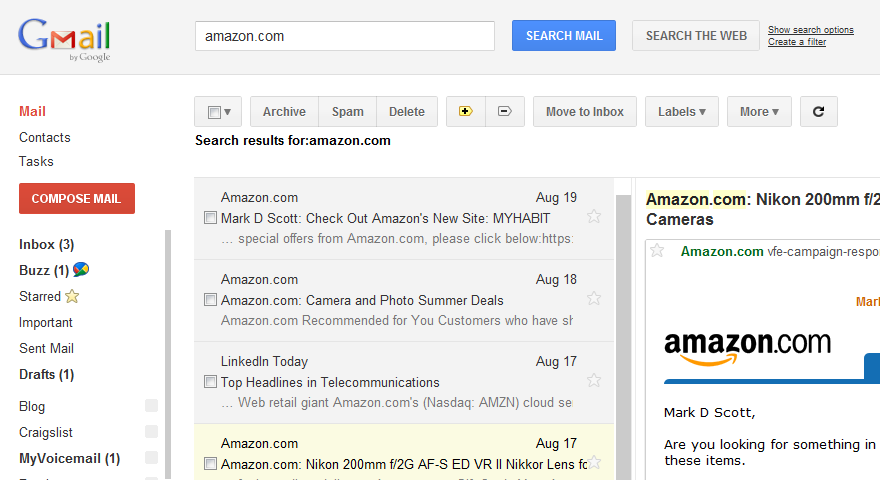
The above screen shot isn’t the best, in part because this extension works the best when you have a large monitor, and in part because Amazon thinks I can afford the 200mm f/2G (a $5,000 lens). I’m fortunate enough to use a 30″ monitor both at home and at work, but posting an 1800-pixel wide image above would not really have helped most people I think.
Basically, though, you can see that the main area is now split into two panes; the left pane shows the list of conversations, and the right pane shows the messages within the selected conversation. Without the extension, when you click on a conversation it normally replaces the message list. I don’t know why it’s called “Preview Pane” other than Microsoft Outlook calls it that. It’s really just a two-panel view (or three-panel, if you count the folder/label list).
Why is such a seemingly cosmetic change so important to me that it sealed the deal? A few reasons:
- It finally gives Gmail an mode of operation that’s optimized for large desktop monitors like the one I use. The prior interface simply left most of my screen real estate unused.
- I can jump directly between messages of interest. Before, if I wanted to read messages # 1, 3, and 7, I had to click 1, click Inbox, click 3, click Inbox, and click 7. Now I can just click 1, 3, 7. This greatly speeds up dealing with mail, much more (for me) than the Priority Inbox feature did.
- It’s better for handling new incoming messages. I can see the new message show up in the message list without interrupting what I’m doing. Before, clicking on the pop-up notification of a new message spawned a new browser window which was always right on top of the one I was previously looking at (because of the way the browser spawns new windows by default – press Ctrl-N and you’ll see what I mean).
- Another reason it was better for handling new messages was that clicking on a new mail pop-up is slow, especially if your connection is not awesome. It would often take 3 or 4 seconds for the window to load and for the message appear. Now, although the mail doesn’t show up in the message list as instantaneously as Outlook, it does get there pretty fast and I can click and see its contents immediately.
Google really prides themselves on speed, as you can see from their insistence on telling you how fast your search ran – but this extension is a great example of how just a better layout with the same underlying technology can make thing vastly faster for the end user. This isn’t going to be perfect for every form factor, but it’s great for me, and it has me using Gmail via the web as my preferred client. I strongly recommend giving this a try! -
Watching E-Sports

In an earlier post, I wrote about NE-SE, a new e-sports organization that was trying to encourage players of all levels to enter their tournament – so that they could raise the cash necessary to pay the ~$50k in prizes that they committed for a live finals. However, I got one critical point wrong – they are charging $20/person as an entry fee, not $10/person. That means the payouts are what I had described ($498,560 per tournament), but what they take in is $1,024,000 instead of $512,000. That makes it a spectacularly good deal for the tournament organizers, if they can get enough people to sign up. Unfortunately for them, especially at $20 instead of $10, you can be pretty sure that they’ll get nowhere close to the numbers to make their scheme work. And with the numbers this much in their favor, I’m really surprised that Blizzard endorsed them.
That being said, I’m definitely a big fan of e-Sports in general. If you haven’t heard the term, it generally refers to competitive gaming and while I suppose it could refer to any competition between people, online or offline/LAN, it’s usually used in the context of professional individuals or teams competing against each other. In North America, e-Sports is still in its infancy, though it’s grown rapidly over the years. South Korea has had a robust e-Sports scene for a decade, ever since the original Starcraft established the phenomenon a dozen years ago.
In Starcraft 2, the best players in the world still hail from South Korea, without question, and the premier league – the GSL (individual) / GSTL (team) – is played there. North America has several organizations trying to establish themselves, but at this point in time, Major League Gaming (MLG) seems to quite clearly be the best. While MLG got off to a bumpy start, the most recent event (MLG Anaheim) was great to watch – and was the first event I tuned into a good bit of live, sending me over my Rogers bandwidth cap for the month. Europe has high level play a well, but I’m less familiar with it. Some bars in North America have even started airing live games from the GSL/GSTL on certain nights of the week (a phenomenon known as Barcraft)!
Beyond top-level professional play, the online nature of the game has given rise to other interesting leagues – like the After Hours Gaming League (AHGL), which features 8 high tech companies (this season, anyways) battling it out. The AHGL started at Facebook, but expanded to 8 other companies, who are competing for the charity of their choice… and a significant amount of pride, since some of the companies are fierce competitors. Fortunately, three of my favorite tech companies are currently in the lead:
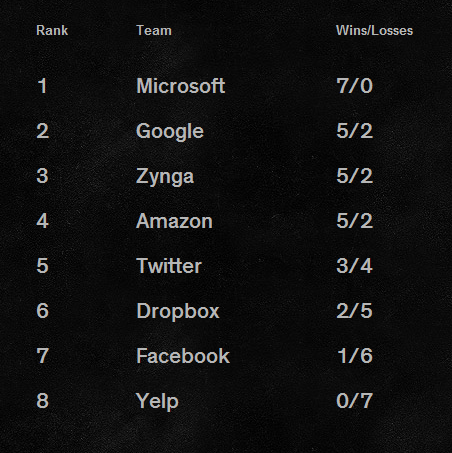
On one Youtube broadcast I was watching recently, one of the commentators (HD Starcraft) said that with games being so much more interesting to watch than regular sports – a comment I actually agree with – that e-Sports was really the future. That, and a bit of analysis on the chart above, are actually very interesting topics…
-
Why lug a DSLR around?
Cameras of all sizes have been getting consistently better over the years. The $600 (including lens) entry-level D3100 takes better pictures than the original $5,000 (body-only) D1 did years ago on its introduction. Compact cameras have benefited on a similar pace, from shooting VGA photos that were at best sufficient for the web, to being indistinguishable at smaller sizes and in the right lighting conditions from much more expensive cameras. The compact camera segment itself is under significant pressure, as an increasing number of people find themselves satisfied with the picture taking capabilities of their cell phones. With all these improvements, are the differences still worth all the extra weight that each size class brings with it?
The Rogers Cup was a great place to ask this question, as the first day that we made an impromptu trip there, I didn’t bring a DSLR and only had my S90 compact camera. I’m still really glad I brought it, but how did it do in general? Here’s Kim Clijsters during her practice, at 6:38pm last Saturday:

I was right up at the edges of the court, but my S90 was still at f/4.5 and ISO 320 to get even remotely enough speed to capture the shot. We were back the next day, same court, 6:34pm – this time, it was Svetlana Kuznetsova from Russia who was practicing:

This second shot was with the D7000 at f/5.6 and ISO 450, using the 70-300 VR lens. At these small sizes, the pictures might not look too different quality wise – but click for larger versions, and you’ll see an enormous difference between the two. In addition, I was much further away with the second picture thanks to the added reach of the 70-300 (and I was only at 100mm!). Sitting for a brief period at an actual game at center court, I really needed the full reach of the 70-300:

At maximum zoom on the S90, the player pictured – Japan’s Kimiko Date-Krumm, in a match against China’s Zheng Jie – would have been six times smaller!
It goes without saying that sports, where both speed and reach are needed, are where you’d expect a DSLR to do well versus compact cameras. What’s worth emphasizing here is that it doesn’t take much equipment to get half-decent results; you could have gotten identical shots to the above with the D5100 ($800) and 70-300 VR lens ($550). You could get near-identical results with the D3100 ($600) and the 55-300 DX VR lens ($350) that pro photographer Thom Hogan posted a positive review of today. In fact, I dare say that even at my limited skill level, you’d even get basically the same results with a used D80/D200 and 70-300 non-VR, the combined used price of which is not far off what I paid for my S90 compact! Pro-level gear for sports gets very expensive, very quickly – to the tune of $5,500 if you want a 300/2.8 lens instead of the 70-300 I used – but you can still do pretty decently at your kids games for a tenth of the price (and only a little more than the price of a compact camera).
At the heart of these differences is just basic physics on the differing sensor sizes:
- The iPhone 4, which is very well-regarded and well-specified for a camera phone, has a 1/3.2″ sensor that’s roughly 4.5mm x 3.4mm = 15.3 mm^2 in total surface area.
- My PowerShot S90, generally considered to be a very competent compact, has a 1/1.7″ sensor that’s 7.6mm x 5.7mm = 43.3 mm^2 area (2.8 times larger than the iPhone 4 sensor)
- Nikon’s DX cameras, like the D5100 and D7000, have APS-C sensors that are 23.7mm x 15.7mm = 372 mm^2 area (8.6 times larger than my S90)
- Full-frame cameras like the D3 series are 36mm x 24mm = 864 mm^2 (2.3 times larger than DX cameras, and over 56 times larger than the iPhone 4 sensor!)
There’s a pretty notable difference between tiers, but the gap between a competent compact and an entry-level DSLR is by far the largest – and at the end of the day, more area means more photons can be captured. There are interchangeable lens formats like four-thirds that fall somewhat in the middle, but overall, it’s not surprising to see that results seem to be consistent with physics.
The other relevant difference not mentioned above is the lenses. The iPhone 4 has a fixed 28mm-equivalent lens. The S90 has a 28-105mm equivalent zoom range. My D7000 with the 18-200 has a 27-300mm equivalent zoom range, and the bag of three lenses I took on Sunday had a 15-450mm range (with some gaps in the middle). Of course, there are compact superzooms, and even cameraphone accessories, but you clearly give up a lot on the reach side with smaller cameras.
In the end, smaller cameras may suffice for many things, but since running kids is a big part of my agenda, I’ll still be lugging the heavier cameras around. I still just wish I had been last Saturday when we met Kim!
-
A couple of Starcraft 2 topics
As I’ve mentioned previously, I’m really quite into Starcraft 2 – despite my continuing inability to make it as far as Diamond league in 1v1. Fortunately, the game is pretty fun regardless of what level you play it at.
The first thing I though worth mentioning is that a free “Starter Edition” is now available; it provides some of the single player content, as well as limited multiplayer. You’re basically restricted to playing as Terran in all cases (as if Terran weren’t doing well enough at high levels of play right now), and can only play on a handful of maps, but it’s still a great way to try things out if you’re not quite ready to quit your job, move to South Korea, and train as a professional gamer. The image below links to more information on this.

The second thing I found interesting was the announcement of the “National E-Sports Event” (NE-SE) on Blizzard’s main Starcraft 2 news page. NE-SE is running a SC2 tournament, available to players of all skill levels, with a US$30,000 prize for the ultimate winner. However, the reason I found it interesting to comment on this is because of the way that this tournament is structured:


